R FAQ How can I explore different smooths in ggplot2? ~~~~~~~~~~~~~~~~~~~~~~~~~~~~~~~~~~~~~~~~~~~~~~~
Types of smooths
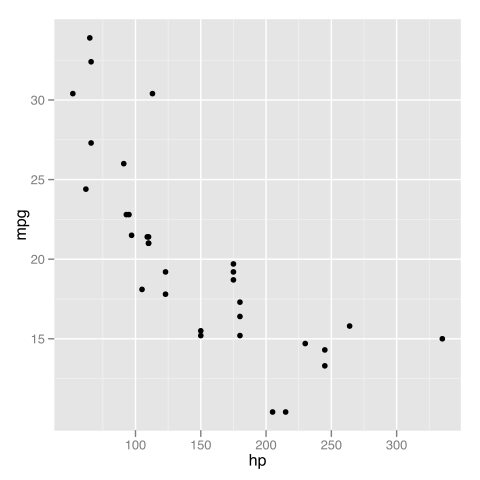
Although points and lines of raw data can be helpful for exploring and understanding data, it can be difficult to tell what the overall trend or patterns are. Adding data summaries can make it much easier to see. When working with two or more variables, rather than raw summaries such as means, we can use conditional means or expected values of one variable based on some model. To demonstrate this, we will use a data set that is built into R, the ‘mtcars‘ data. Specifically, we will look at the relationship between miles per gallon (mpg) and horsepower (hp). in 32 different cars.
head(mtcars)
##                    mpg cyl disp  hp drat    wt  qsec vs am gear carb
## Mazda RX4         21.0   6  160 110 3.90 2.620 16.46  0  1    4    4
## Mazda RX4 Wag     21.0   6  160 110 3.90 2.875 17.02  0  1    4    4
## Datsun 710        22.8   4  108  93 3.85 2.320 18.61  1  1    4    1
## Hornet 4 Drive    21.4   6  258 110 3.08 3.215 19.44  1  0    3    1
## Hornet Sportabout 18.7   8  360 175 3.15 3.440 17.02  0  0    3    2
## Valiant           18.1   6  225 105 2.76 3.460 20.22  1  0    3    1
require(ggplot2)
require(methods)
p <- ggplot(mtcars, aes(x = hp, y = mpg)) + geom_point()
print(p)
plot of chunk mtcars
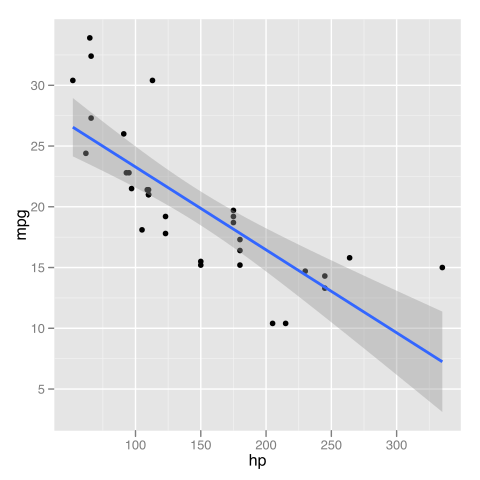
One thing to notice is that into the ‘p‘ object, we saved both the basic plot setup and the request to add points. This saves typing down the road if we know we always want points plotted in our graph. A quick visual of the data indicates the relationship may not be linear. This is confirmed when we look at a linear smooth. The fit is poor at the extremes.
p + stat_smooth(method = "lm", formula = y ~ x,
    size = 1)
plot of chunk linear-fit
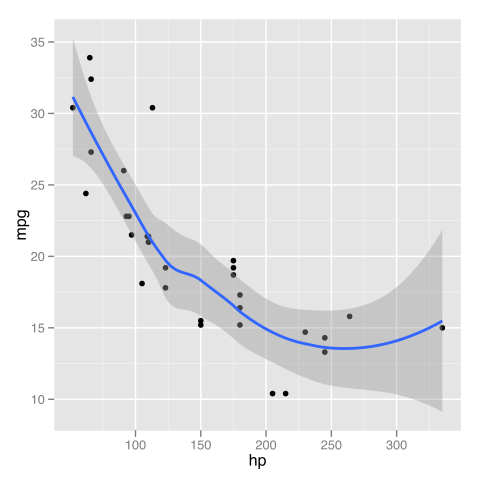
To get a sense of something like the mean miles per gallon at every level of horsepower, we can instead use a locally weighted regression.
p + stat_smooth(method = "loess", formula = y ~
    x, size = 1)
plot of chunk local-wt-reg
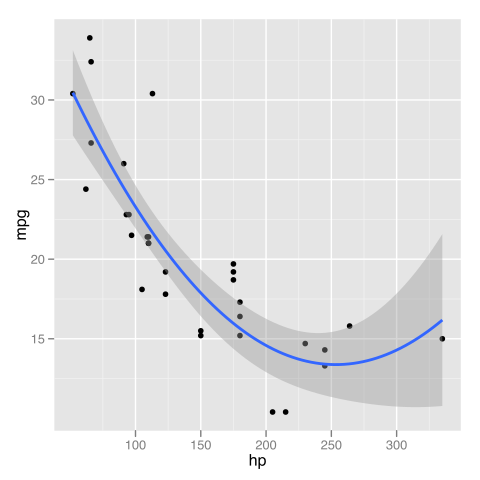
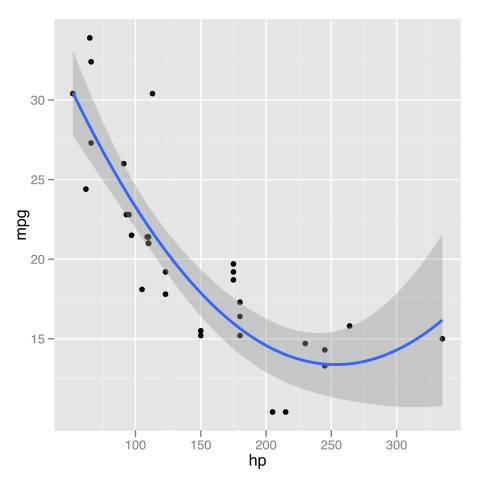
Looking at the fit, it seems a quadratic function might be a good approximation. We can go back to a linear model, but change the formula to include a squared term for x (which is horse power here).
p + stat_smooth(method = "lm", formula = y ~ x +
    I(x^2), size = 1)
plot of chunk quad-fun-approx
We could achieve the same results using orthogonal polynomials, in this case with a second order (quadratic) polynomial. The advantage is that the poly() function can easily fit polynomials of arbitrary degree
p + stat_smooth(method = "lm", formula = y ~ poly(x,
    2), size = 1)
plot of chunk polynomial-fit
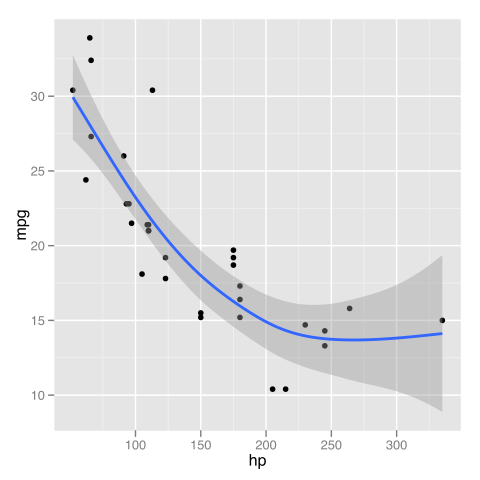
Another flexible aspect of the smooths is that it can use many different modelling functions as long as they follow some common conventions. This opens up access to many R packages to fit very specialized models. For the sake of demonstration, we will try a generalized additive model (GAM) from the ‘mgcv‘ package with a smooth on the x predictor variable. First we load the required package, and then show how it is easily used inside our graph.
require(mgcv)
p + stat_smooth(method = "gam", formula = y ~
    s(x), size = 1)
plot of chunk gams
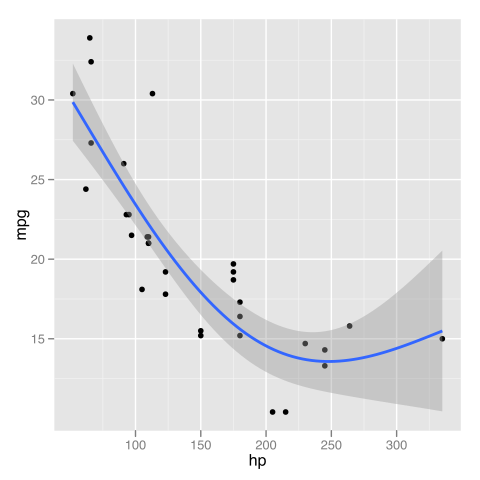
The GAM with a smooth seems to fit the data better than the straight line did. We could also customize the basis dimension. Arbitrarily, we choose 3.
p + stat_smooth(method = "gam", formula = y ~
    s(x, k = 3), size = 1)
plot of chunk custom-gam
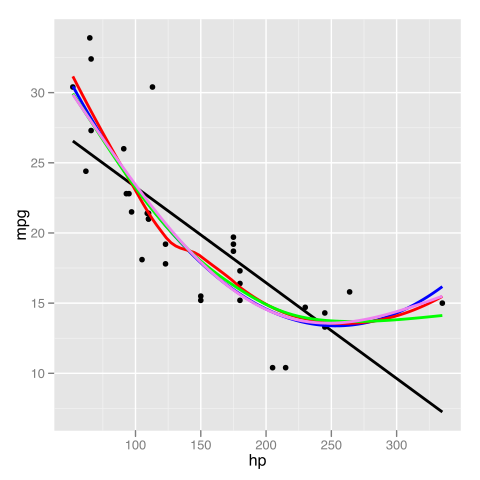
If we wanted to directly compare, we could add multiple smooths and colour them to see which we like best. By default each smooth would include shaded standard errors, which would be messy so we turn them off.
p + stat_smooth(method = "lm", formula = y ~ x,
    size = 1, se = FALSE, colour = "black") + stat_smooth(method = "lm",
    formula = y ~ x + I(x^2), size = 1, se = FALSE, colour = "blue") +
    stat_smooth(method = "loess", formula = y ~ x, size = 1,
        se = FALSE, colour = "red") + stat_smooth(method = "gam",
    formula = y ~ s(x), size = 1, se = FALSE, colour = "green") +
    stat_smooth(method = "gam", formula = y ~ s(x, k = 3),
        size = 1, se = FALSE, colour = "violet")
plot of chunk multiple-smooths
It is clear in this case that all the models except the strictly linear fit the data similarly. To distinguish which was “best” any further would likely require comparing model fit statistics.
Smooths can also be fit separately by levels of another variable. This allows a sort of examination of ‘interactions’ in the data.
ggplot(mtcars, aes(x = hp, y = mpg, colour = factor(vs))) +
    geom_point() + stat_smooth(method = "lm", formula = y ~
    x, se = FALSE)
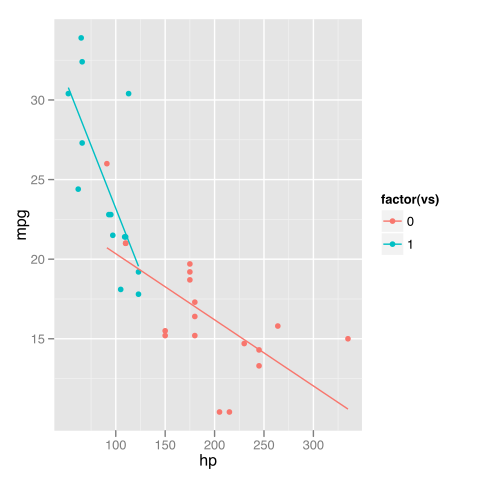
plot of chunk by-levels
ggplot(mtcars, aes(x = hp, y = mpg, colour = factor(vs))) +
    geom_point() + stat_smooth(aes(group = 1), method = "lm",
    formula = y ~ x, se = FALSE)
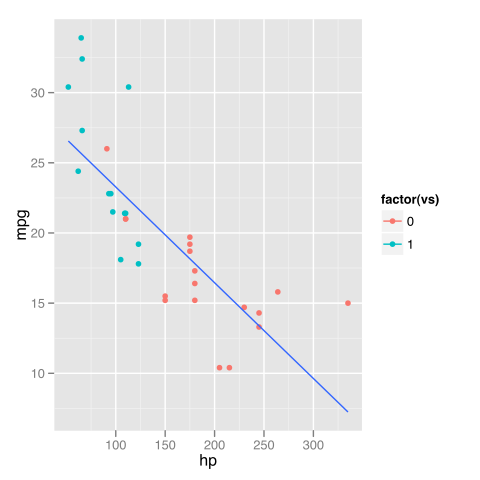
plot of chunk by-levels
ggplot(mtcars, aes(x = hp, y = mpg)) + geom_point(aes(colour = factor(vs))) +
    stat_smooth(method = "lm", formula = y ~ x, se = FALSE)
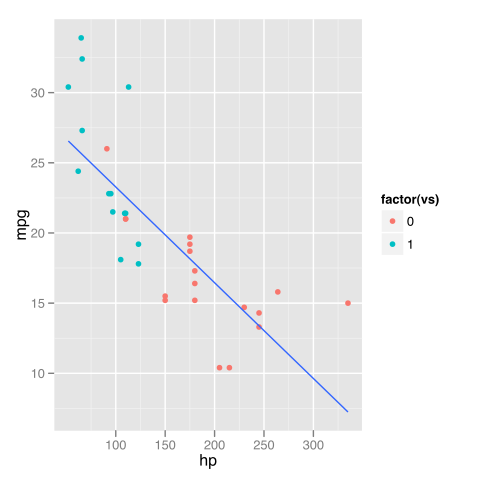
plot of chunk by-levels
Summary
Smoothed, conditional summaries are easy to add to plots in ggplot2. This makes it easy to see overall trends and explore visually how different models fit the data. Many of the examples were redundant or clearly a poor choice for this particular data; the purpose was to demonstrate the capabilities of ggplot2 and show what options are available. Each example may be more or less appropriate for exploring a particular set of data.